
Appearance
Input formats
Every format below is resolved by the Rust core (crates/profile-core/src/import.rs, load_capture_options), which picks an adapter by path kind and extension. The GUI's file picker offers a single filter, "ROCm and RADV captures", accepting:
json csv att rocprof-att rocprof-capture rocpd rpd db sqlite rgp irpfDirectory mode instead selects a decoded ui_output_* directory or a raw ATT directory.
Import is read-only
No adapter writes into your input. ROCPD databases are opened read-only / query-only; the raw-ATT decoder works inside a temporary directory and never writes decoded files into the input directory.
What each adapter loads
| Artifact | Producer | What the adapter does |
|---|---|---|
Decoded ui_output_* directory (has filenames.json) | rocprofv3 / ROCprof Compute Viewer decode output | Full capture: timeline, waves, ISA, occupancy, source links. |
filenames.json / code.json / occupancy.json opened directly | a decoded capture manifest | Resolves to the parent directory and loads it as above. |
| rocprofv3 kernel-trace CSV | rocprofv3 | Kernel dispatch timeline from the CSV columns. |
| Per-dispatch counter-collection CSV | rocprofv3 | Counter samples associated with dispatches. |
| Host-trap / stochastic PC-sampling CSV | rocprofiler-sdk PC sampling | Detected by a Sample_Timestamp column; method is "stochastic" if Wave_Issued_Instruction is present, else "host-trap". Lands in a separate observation table. |
| Standalone SPM results JSON | rocprofv3 / rocprofiler-sdk | Scalar/streaming performance-monitor series. |
| Host-trap / stochastic PC-sampling JSON, and combined SPM/PC JSON | rocprofiler-sdk | If both host-trap and stochastic are present, the desktop shows a method chooser. |
.rpd / .rocpd / .db / .sqlite (ROCPD / legacy) | ROCm SDK rocpd / legacy rocmProfileData | Opens the database read-only; UUID-partitioned ROCm SDK databases are handled. Bounded per query (see Limits); ROCPD support is "Partial". |
.rocprof-capture | this app's Archive capture export | A portable capture that opens without the original input directory or decoder. |
.rocprof-att manifest | this app's ATT setup | Decodes the described raw-ATT traces and code objects. |
Raw ATT .att file | rocprof-trace-decoder output | Decodes the matching process/run across SE files. Needs the decoder prerequisites. |
Raw ATT directory (no filenames.json) | as above | Discovers runs, then decodes; a directory with multiple runs opens a run chooser. |
RADV .rgp | Mesa RADV driver | Vulkan compute hardware counters, thread traces and kernel names (experimental — see RADV). |
HRX native .irpf | HRX libhrx (HRX_PROFILE_MODE=queue|dispatch) | IREE HAL IRPF v2.0 profile bundle: resolved dispatches, function names, code-object identity and clock correlations; no waves, ISA or hardware counters. Raw device ticks converted to elapsed ns; events are not placed on a host timeline (device-tick-unaligned). Also recognised by magic when the file lacks the .irpf extension. See HRX profiling. |
Loom compile report (*.compile-report.json, or an iree-benchmark-loom benchmark envelope) | loom-compile / iree-benchmark-loom (hrx-system) | Version-zero static compile facts about a compiled kernel: identity, static and dynamic instruction mix, target resources, allocation and spill facts, wait plan, workload geometry, residency and constraints, move causes, detail rows. Validated against the strict version-zero loader and kept on a surface separate from dispatches and measured data. No cycles and no runtime counts; absent fields stay absent. Recognised by the .compile-report.json suffix or a loom.compile_report content sniff. See HRX profiling. |
.rocprof-project | this app's Save project | Restores a saved workspace; references the original capture paths (not loaded through the capture dispatcher — see Projects). |
Raw ATT setup
For named rocprofv3 inputs (*_shader_engine_<SE>_<RUN>.att, *_code_object_id_<ID>.out), open a directory or choose an .att file with the capture-tab +; a directory with multiple runs opens a run chooser. For arbitrary filenames, or any unrecognised .att name, the app opens ATT setup, where you pick the traces and code objects and enter their recorded shader-engine / code-object IDs, then save a reusable .rocprof-att manifest. Code-object IDs are stored as decimal strings to preserve all 64 bits. Setup does not guess IDs, rename inputs, or load unrelated sibling code objects; manifests may use paths relative to their own directory.
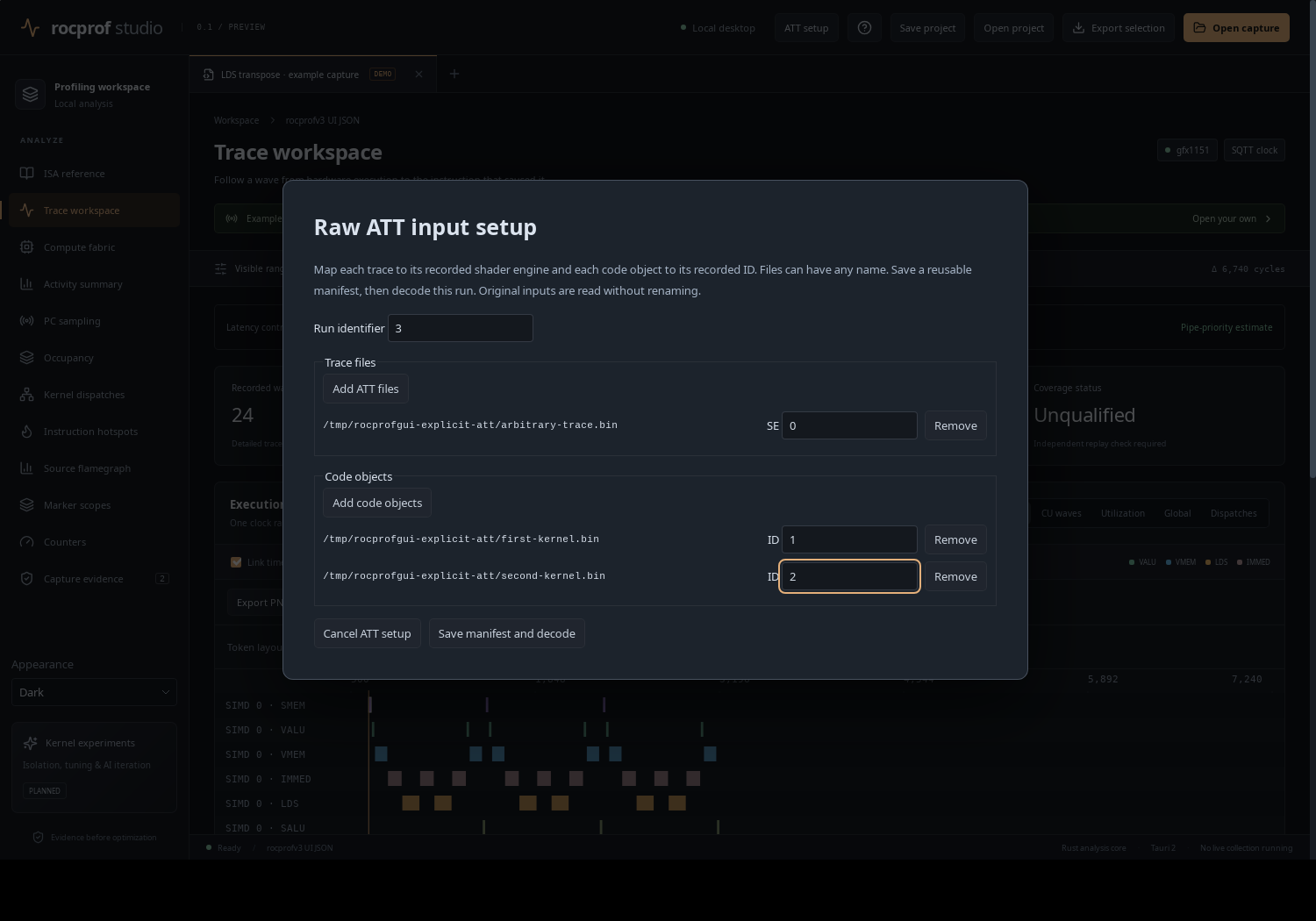 ATT setup in the desktop app: mapping raw
 .att traces and .out code objects to shader-engine / code-object IDs.
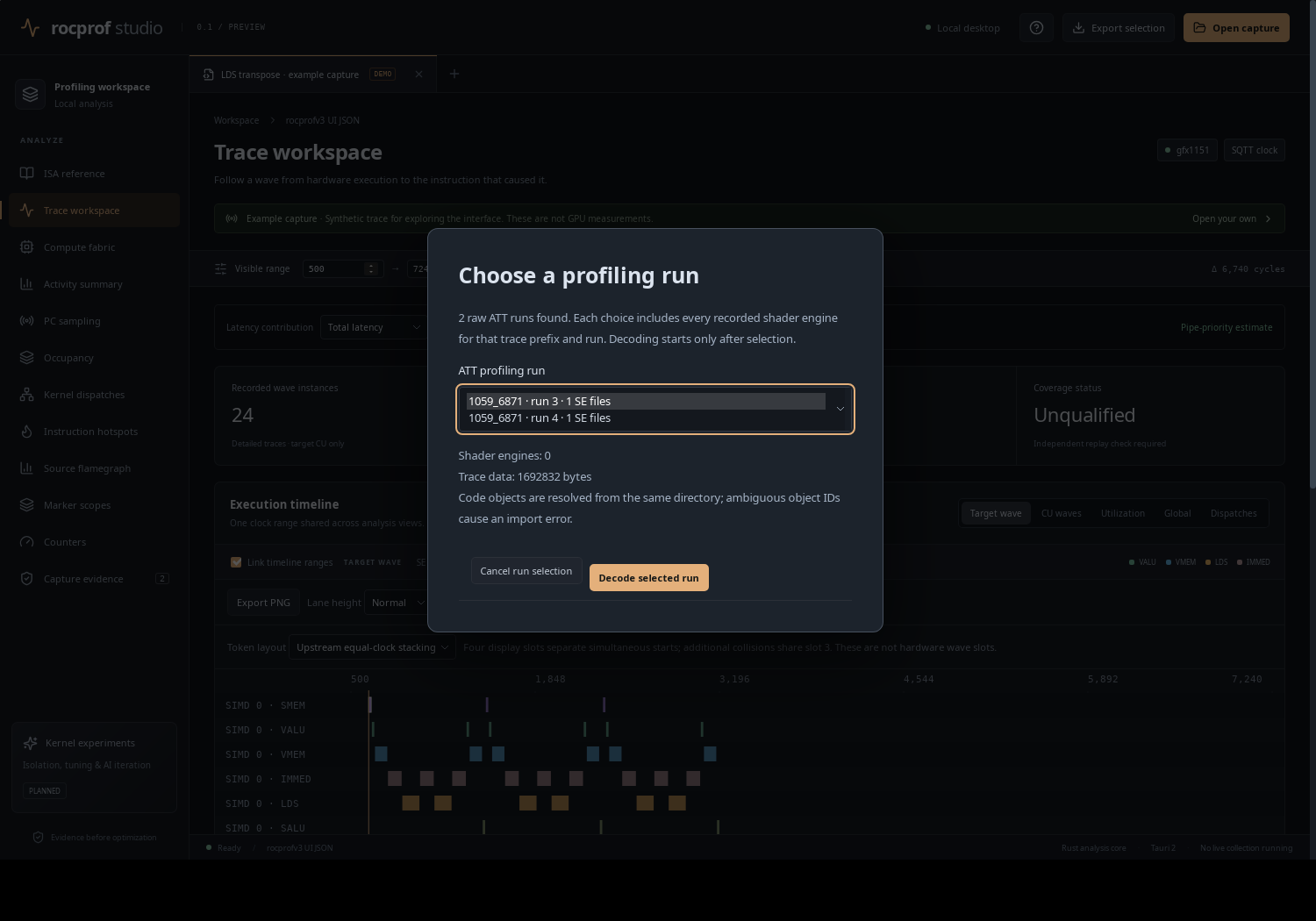 When a directory holds several ATT runs, a run chooser appears.
Before you import
- Decoded captures are self-contained. They need no Python, no decoder library and no ROCm disassembly tools; only raw ATT does.
- Coverage cannot be proven from a dispatch CSV alone. A CSV that looks complete does not prove every dispatch was observed. See Limits & caveats.
- The headless CLI opens the same inputs as the desktop, including
.rocprof-attmanifests: all three surfaces share one cancellable, fingerprinted import router.
Browser-testable fixtures ship with the repo: public/demo.json (the bundled synthetic example), public/demo-hidden.json, fixtures/rocpd/sdk-3.0.4.json and .db, fixtures/transpose-ui/*, and fixtures/radv-rgp/*.rgp.